
Site Setup Tracker
The Site Setup Tracker is designed to track all levels of a system's onboarding with Denowatts and highlight any areas that require more action from the customer, installer, or Denowatts
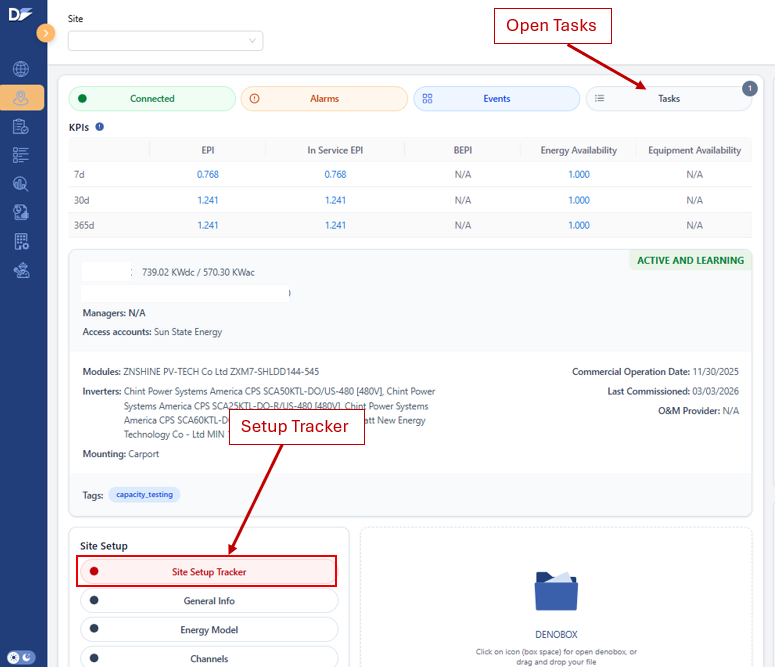
If any portion of the setup is incomplete, it will be marked as "incomplete", and the button on the Site Overview Page will show a red fill. Any open items from the original commissioning will also be noted as an open Task. The open tasks can be found in the "Feed" by clicking the "TASKS" icon on the Site Overview Page.
If the setup tracker is complete, the button will appear on the Site Overview Page with a green fill.
Open Tasks and Setup Tracker Links:
- Below is a site with 1 open task, and a setup tracker that is not yet completed
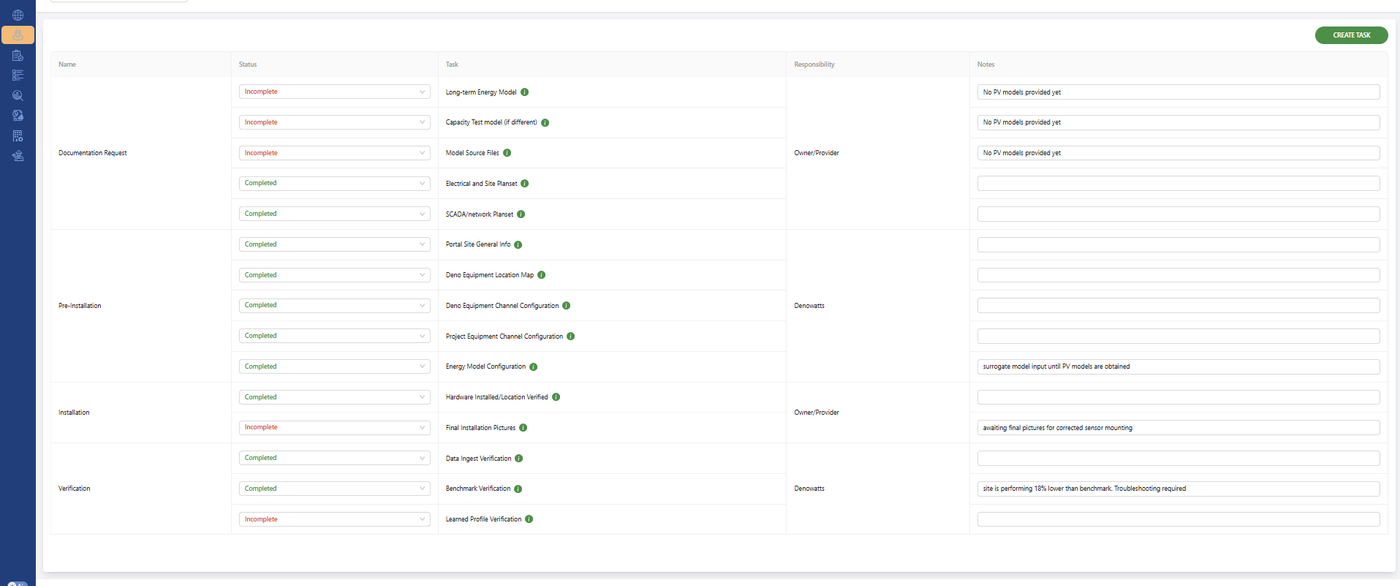
Example Site Setup Tracker:
- Below is an example of a site setup tracker that has a few open items and notes are associated with the open items
Tracker Sections
Documentation Request
Keeps track of all necessary documents for a full Denowatts Commissioning. Some of this information is required before installation, and some of it after. It is best to upload documents as soon as they are available.
-
Long-Term Energy Model (pro forma) - PVsyst summary PDF (or similar modeling software) for long-term energy analysis and bankability.
-
Capacity Test Model (if capacity test was ordered and required) - contractual 8760s from the owner that will be used for capacity testing.
-
Model Source Files - PVsyst.prj (or similar software) file with captest variant that includes .shd file for shade importing. Denowatts can also extract 8760s from PRJ files if required.
-
Electrical and Site Planset - site drawings (as-builts preferred), allow Denowatts to program any proxy PV models, create a Deno hardware location plan, and verify as-built system with provided PV models.
-
SCADA/network Planset - Drawings (as-builts preferred) of the DAS/SCADA system. Helps Denowatts recognize what hardware to specify for the site, recognize physical space available, and efficiently set up modbus channels
Pre-Installation
This step is completed by Denowatts prior to installation, using the site's electrical planset, SCADA planset, and any preliminary energy model provided.
-
General Information - Owner, Address, Build Date, Service Status, etc
-
Deno Equipment Location Map - Created by Denowatts prior to shipment using the array layout from the drawings and sent in an email with the hardware shipment notification and hardware installation instructions
-
Deno Equipment Channel Configuration - Deno Sensor and Gateway channels assigned to the site are added to the portal.
-
Project Hardware Channel Configuration - modbus channel configured using the provided SCADA planset (inverters, meters, trackers, etc)
-
Energy Model Configuration - Configured by denowatts using the provided PV models.
Installation
Completed during the physical installation. Denowatts typically works with technicians during this phase, ensuring that sensors/gateways are properly installed, that photos of the installation are uploaded, and that all required devices are connected to the Denowatts Gateway. Technicians should call Denowatts' support line when working through the install for the best results. (978.309.6688 x 1 or support@denowatts.com)
-
Hardware Installed & Location Verified - Denowatts equipment locations verified, and any deviations from the original plan are documented and verified
-
Final Installation Pictures - All final pictures of Denowatts equipment have been uploaded to the Denowatts Mobile App and verified by Denowatts as an adequate install.
Verification
This phase typically starts immediately after the physical installation, but in some cases, it must wait until the site is fully operational, as it requires all device data to be energized and online. This step is completed by Denowatts, but if any devices show invalid data, a Task may be opened to verify that the devices have been set up properly onsite.
-
Data Ingest Verification - Deno Gateways, Deno Sensors, Meters, Inverters, and Tracker data is connected to the Denowatts portal, and data is valid.
-
Benchmark Verification - The modeled benchmark is tracking appropriately with system operation.
-
Learned Profile Verification - After the site is set to "active and learning," Denowatts sets a learned profile of the system's operation, and ensures it is accurate.
Last updated on