
3rd-party Pyra.
How to properly install a 3rd-party Pyranometer.
Another optional auxiliary sensor is the 3rd-party Pyanometer. This is not a part of the Denowatts kit and is supplied by the customer. To connect
Terminations
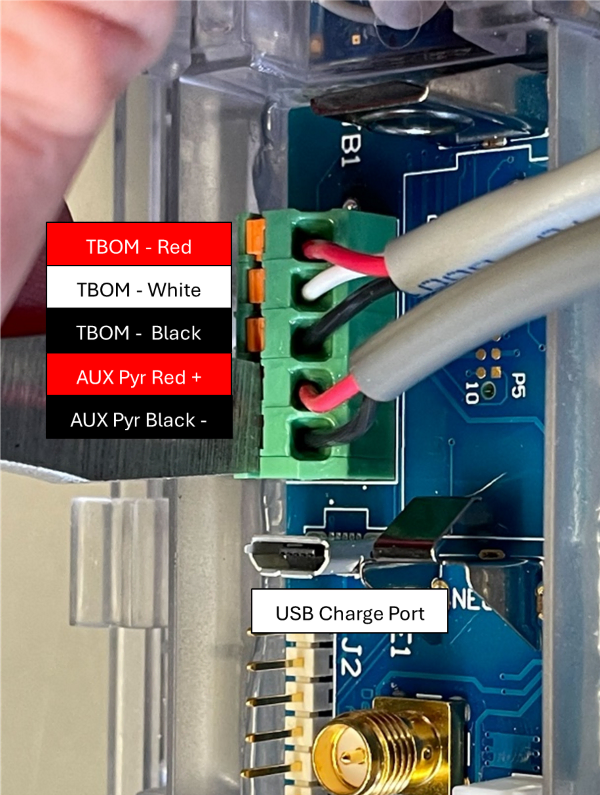
Please check that the 3rd Party Pyranometer terminations correspond with the Aux Pyr terminals image below.
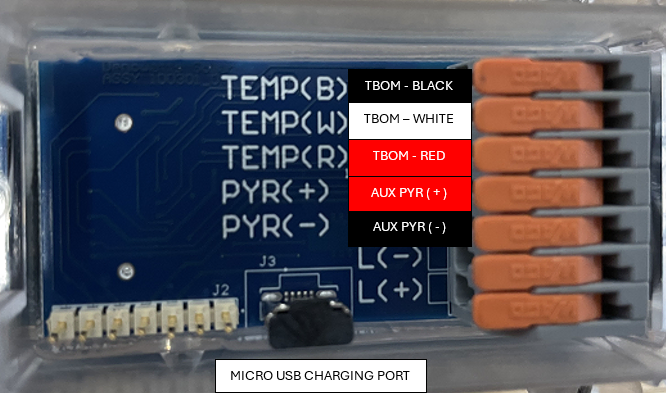
If you are replacing an old 3rd-party Pyranometer on a Deno 4.2 or 4.3, use the image above. If you are servicing a 3rd-party pyranometer on Deno models 4.0 and 4.1, use the image below.
Installation Steps
1. Read 3rd-party Documentation
Read the 3rd-party pyranometer manual to understand the mounting and wiring instructions.
2. Terminate Wires
Use the termination pictures above to properly land the wires in the back of the Deno Sensor.
3. Pictures
Please document the entire installation with several photos.
Please contact Denowatts at any point while reading this guide with questions, comments, or concerns:
- By Phone: 978.309.6688 x1
- Email: support@denowatts.com
- Check out the Denowatts Support Center for more articles that dive deeper into our methodology and software.
Last updated on